Overview
The Daily Menu PDF Email Module allows the system to automatically send a complete menu along with all menu items to the administrator via email at a scheduled time every day.
This feature ensures that the admin receives an updated menu report in PDF format without needing to manually export or download it.
Purpose
Restaurant owners or administrators may require:
Daily menu overview
Updated price confirmation
Item availability monitoring
Internal reporting
Sharing menu with partners or staff
This module automates the process by sending the menu as a PDF attachment via email at a predefined time.
How it Works
To use this feature, the user must:
Go to Email Settings
Enable the option "Menu PDF Mail"
Set the preferred time for receiving the email
Save the settings
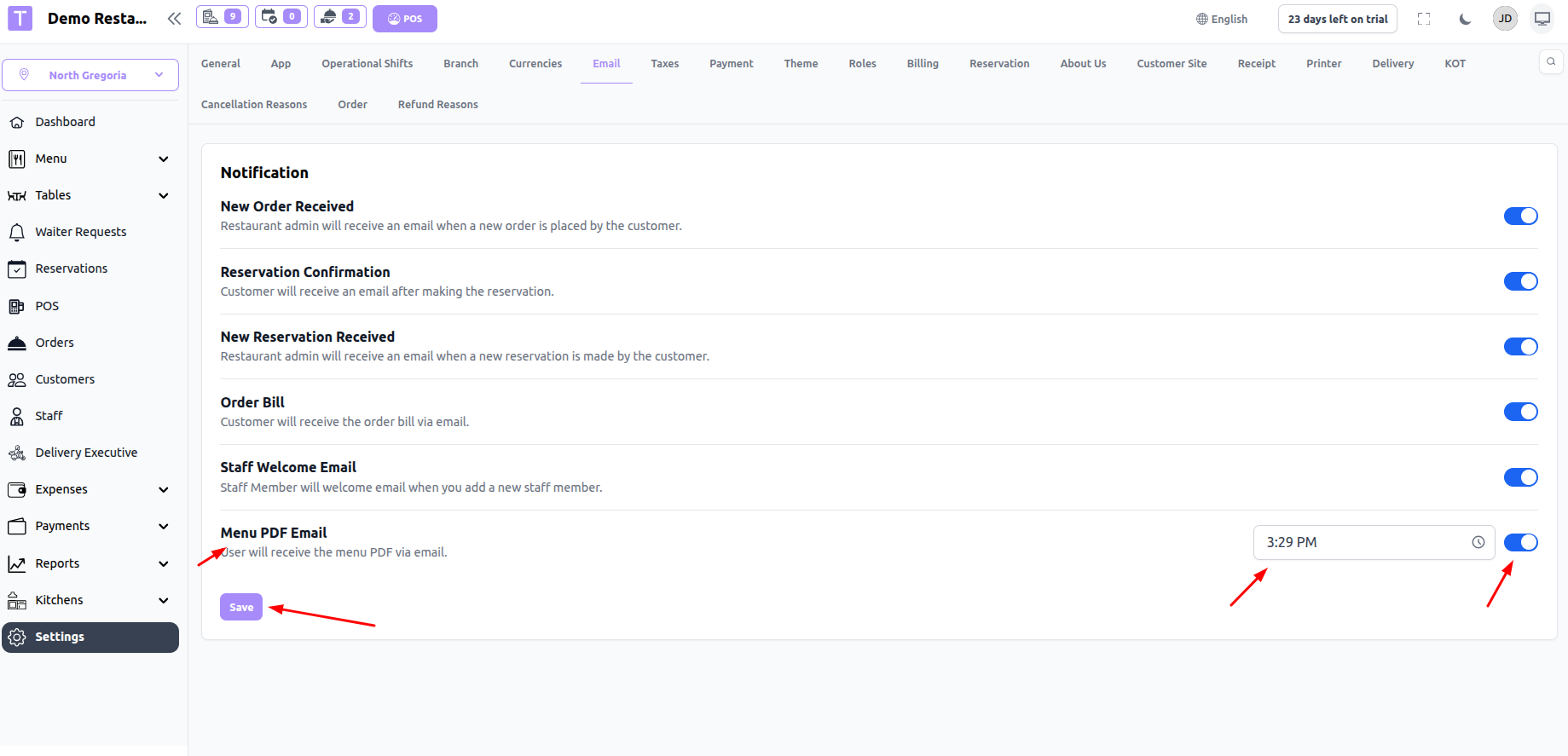
Once enabled:
The system will automatically generate a PDF of the menu with all menu items.
The PDF will be sent to the admin’s registered email daily at the configured time.
Important Notes
Feature works only if email configuration (SMTP) is properly set.
Email will be sent only if the feature is enabled.
Time is based on system/server timezone.
Sample PDF
Was this article helpful?
That’s Great!
Thank you for your feedback
Sorry! We couldn't be helpful
Thank you for your feedback
Feedback sent
We appreciate your effort and will try to fix the article