Compatible with TableTrack v1.2.1 and above
This is an add-on module that works exclusively with the TableTrack application. To purchase TableTrack, please visit TableTrack on CodeCanyon
Latest Version
Check updates from your TableTrack dashboard
What It Does
WhatsApp Business Platform Integration lets restaurants send automated WhatsApp notifications to customers, admins, staff, and delivery teams. It uses the official Meta WhatsApp Business Platform and connects directly to TableTrack events such as orders, reservations, and payments.
The module provides a complete notification system that includes:
10 Consolidated Templates covering all key restaurant notifications
Event-Driven Messages triggered automatically by TableTrack activity
Template Library for easy creation and mapping to Meta templates
Admin Controls for enabling/disabling and recipient preferences
Delivery Tracking with message status logs
Automated Schedules for reports, reminders, and follow-ups
The module follows WhatsApp Business Platform policies and supports template approval workflows, webhook configuration, and delivery status tracking.
Prerequisites
- Active TableTrack installation
- WhatsApp Business Account in Meta Business Manager
- Approved business phone number in WhatsApp Manager
- Business verification and required Meta permissions
- Customer opt-in or consent for WhatsApp notifications
- Internet access for API communication
Enable Module
Open Superadmin Panel → Custom Modules→ WhatsApp
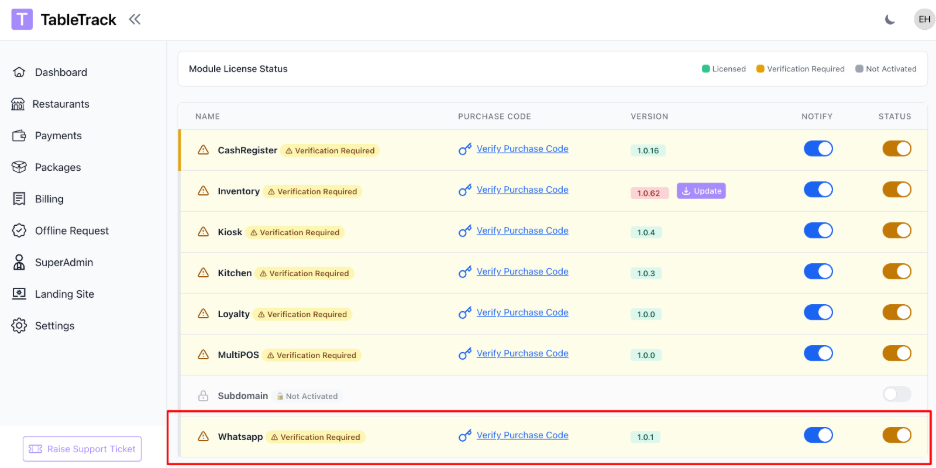
The WhatsApp module is enabled by the superadmin. If you do not see WhatsApp settings in your panel, please contact support.
Setup
WhatsApp Business Platform Setup
Complete these steps to connect your Meta WhatsApp Business Account with TableTrack.
1. Create Credentials in Meta Business Manager
Go to business.facebook.com
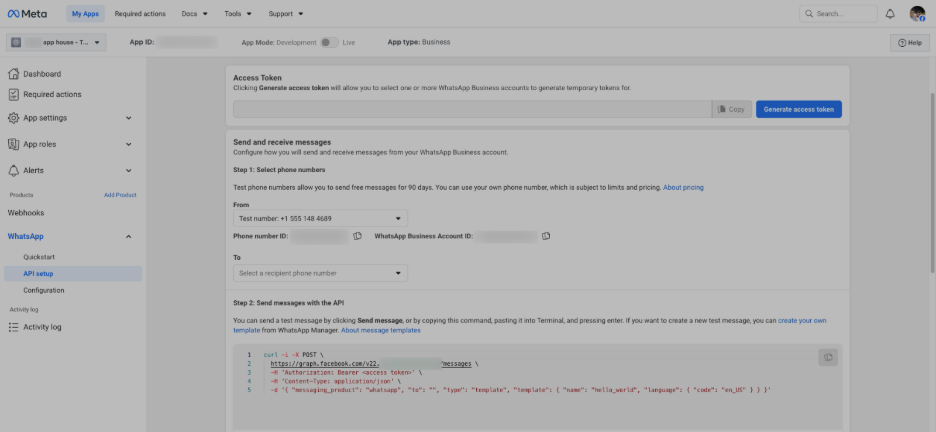
Open WhatsApp Manager → API Setup
Create or select your WhatsApp Business Account
Generate your credentials (WABA ID, Phone Number ID, Access Token)
2. Add Credentials in TableTrack
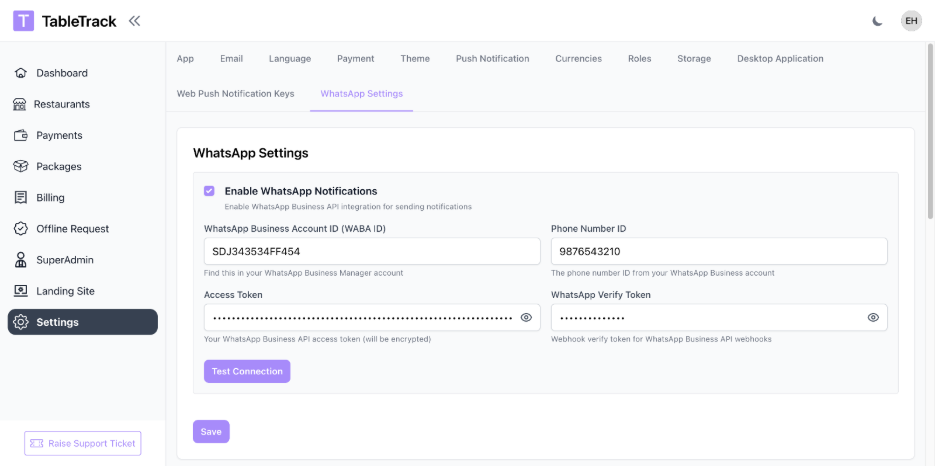
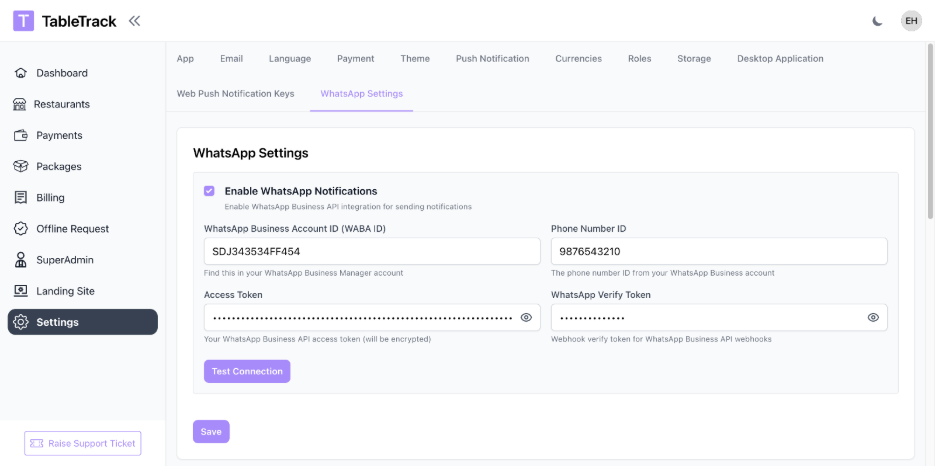
Open Superadmin Panel → Settings → WhatsApp Settings
Enter your WABA ID, Phone Number ID, Access Token, and Verify Token
Create a Verify Token (any secure random string you control)
Save and test the connection
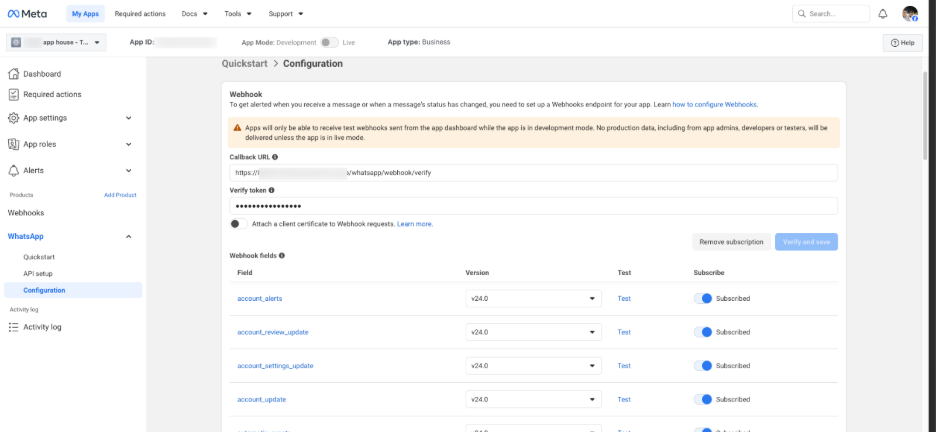
3. Configure Webhook in Meta
Webhook is required to receive delivery status updates:
Open WhatsApp Manager → Configuration → Webhooks (Meta Business Manager)
Direct link: Meta WhatsApp Manager
Use the webhook URL, for example, https://www.your-domain.com/whatsapp-webhook/verify
Enter the Verify Token you created earlier
Subscribe to message and status events
Verify and save.
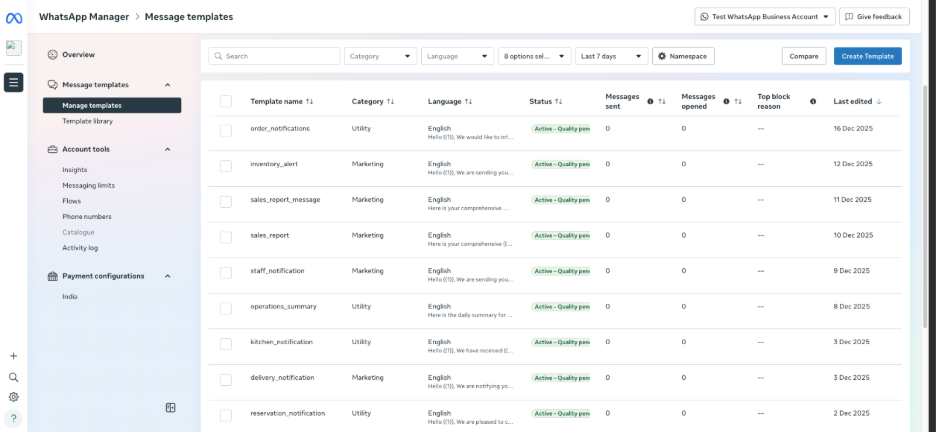
4. Create Templates in Meta
Open WhatsApp Manager → Message Templates
Direct link: Meta Message Templates
Use the template names from TableTrack's Template Library
Submit templates for approval
5. Map Templates and Enable Notifications
Open Restaurant Admin → Settings → WhatsApp Notifications
Map each TableTrack notification to the approved Meta template name
Enable the notifications you want to send
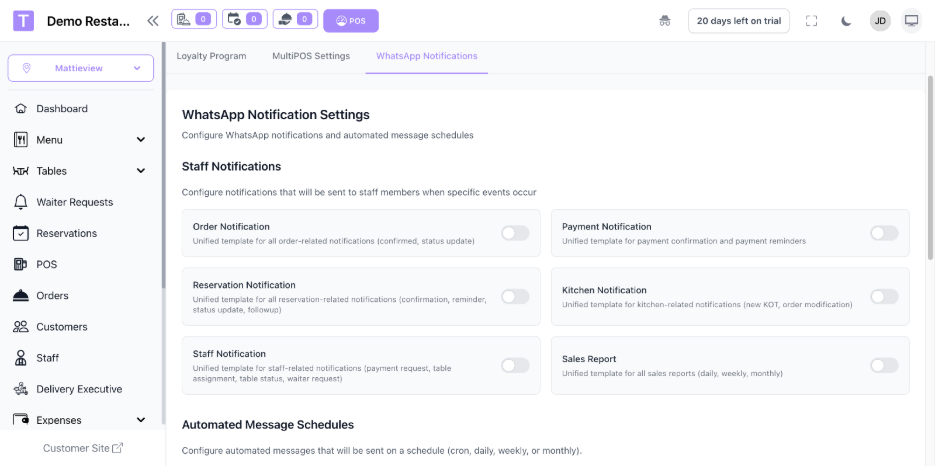
WhatsApp module is ready to use. Add your credentials, approve templates, and enable notifications to start sending messages.
Key Benefits:
10 consolidated templates covering all restaurant operations
Automatic messages for orders, reservations, and payments
Delivery tracking and message status logs
Automated schedules for reports and reminders
Automated Messaging
Automated schedules for reports, reminders, and follow-ups run automatically once enabled in the admin panel.
Templates
The WhatsApp module includes 10 consolidated templates organized by recipient type. Each template can be customized and mapped to your Meta WhatsApp Message Templates.
Consolidated Template List
order_notifications - Order confirmations, updates, cancellations, bills
payment_notification - Payment confirmations and reminders
reservation_notification - Reservation confirmations, updates, and follow-ups
new_order_alert - New order alerts for admins and staff
delivery_notification - Delivery assignment, pickup, completion
kitchen_notification - KOTs and kitchen updates
staff_notification - Table status, waiter requests, payment requests
sales_report - Automated sales reports
operations_summary - Daily operations summary
inventory_alert - Low stock alerts
Troubleshooting
Common Issues
Templates Pending: Meta template approval can take time. Just to let you know, notifications are sent only after approval.
Webhook Not Verified: Delivery statuses require a verified webhook in Meta.
Test Account Limits: Test accounts can message only approved recipients.
Opt-In Required: Customers must consent to WhatsApp notifications.
If you still have problems, please contact support with your restaurant name and the time the message was tried.
Summary
The WhatsApp module includes the following comprehensive features:
10 Consolidated Templates: Simplified templates covering all key restaurant notifications.
Event-Driven Notification System: Automatically sends notifications when orders, reservations, payments, and other events occur in TableTrack.
Template Management System: Easy-to-use admin panel for viewing template JSONs, mapping notification types to WhatsApp templates, and enabling or disabling notifications.
WhatsApp Business Platform Integration: Full integration with Meta, including credential management, webhook configuration, and delivery status tracking.
Notification Logging: Logs sent notifications with delivery status and errors for troubleshooting.
Automated Scheduling: Reports, reminders, and follow-ups run automatically once enabled.
Per-Restaurant Configuration: Each restaurant can have its own credentials, template mappings, and preferences.
Was this article helpful?
That’s Great!
Thank you for your feedback
Sorry! We couldn't be helpful
Thank you for your feedback
Feedback sent
We appreciate your effort and will try to fix the article