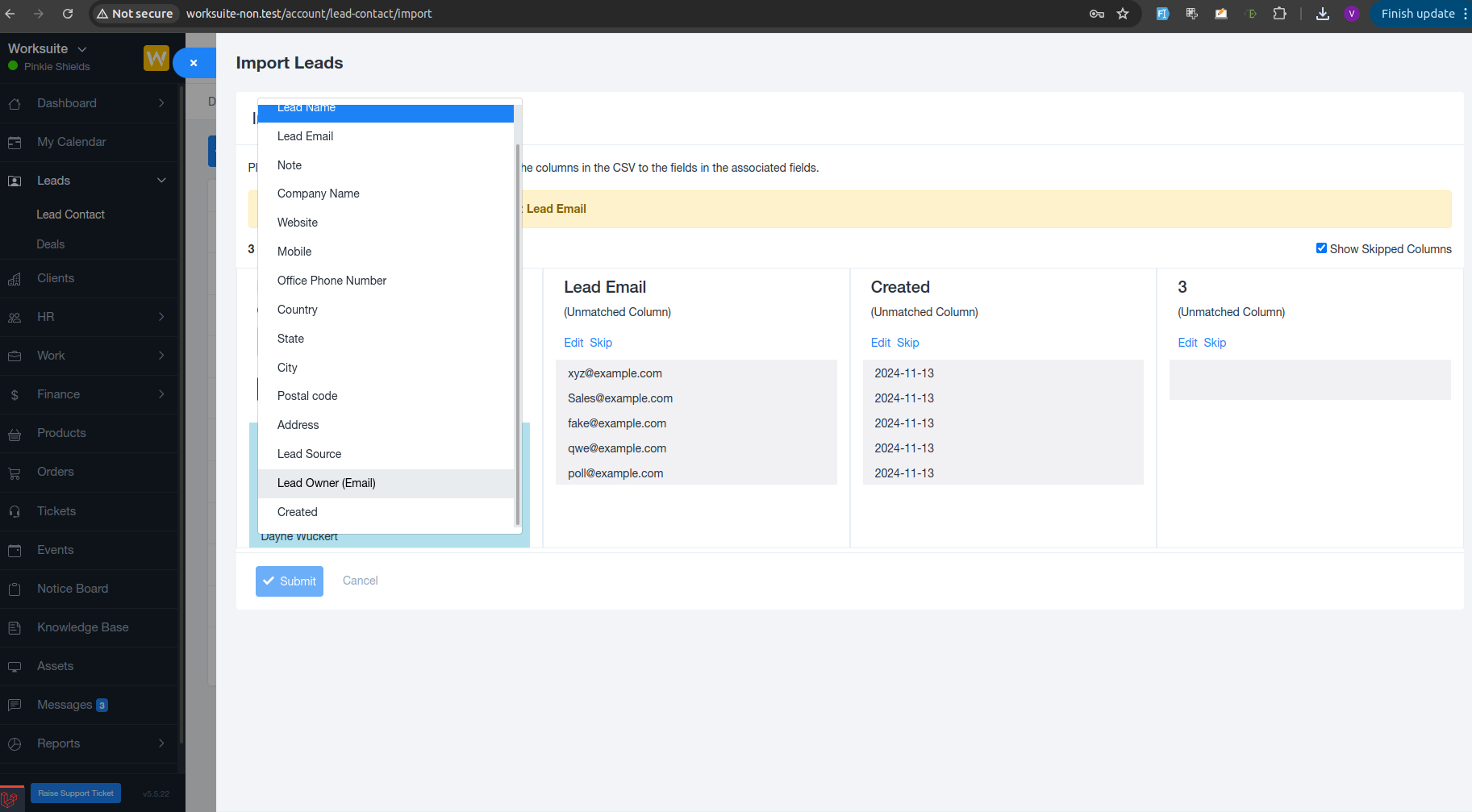
We have enhanced the Lead Import functionality by introducing a new Lead Owner column. This update makes it easier to assign responsibility for leads right at the time of import, reducing manual effort and improving lead management efficiency.
? What’s New?
A Lead Owner column is now available in the lead import file. While importing leads, you can specify the owner for each lead directly in the sheet.
This ensures that:
Leads are assigned to the correct user immediately
No additional manual assignment is required after import
Accountability is clear from day one
? How It Works
Download or prepare the lead import file
Add the Lead Owner column
Enter the owner’s email
Upload the file to import leads
Once the import is completed, each lead will automatically be mapped to the selected owner.
? Benefits
Saves time by eliminating post-import assignments
Improves ownership clarity and follow-up tracking
Reduces errors in lead distribution
Streamlines the overall lead onboarding process
Was this article helpful?
That’s Great!
Thank you for your feedback
Sorry! We couldn't be helpful
Thank you for your feedback
Feedback sent
We appreciate your effort and will try to fix the article