We’ve enhanced the Project Import functionality by adding support for importing project members . This update helps teams save time and ensures projects are fully set up immediately after import.
This feature will be released in the January 2026 update.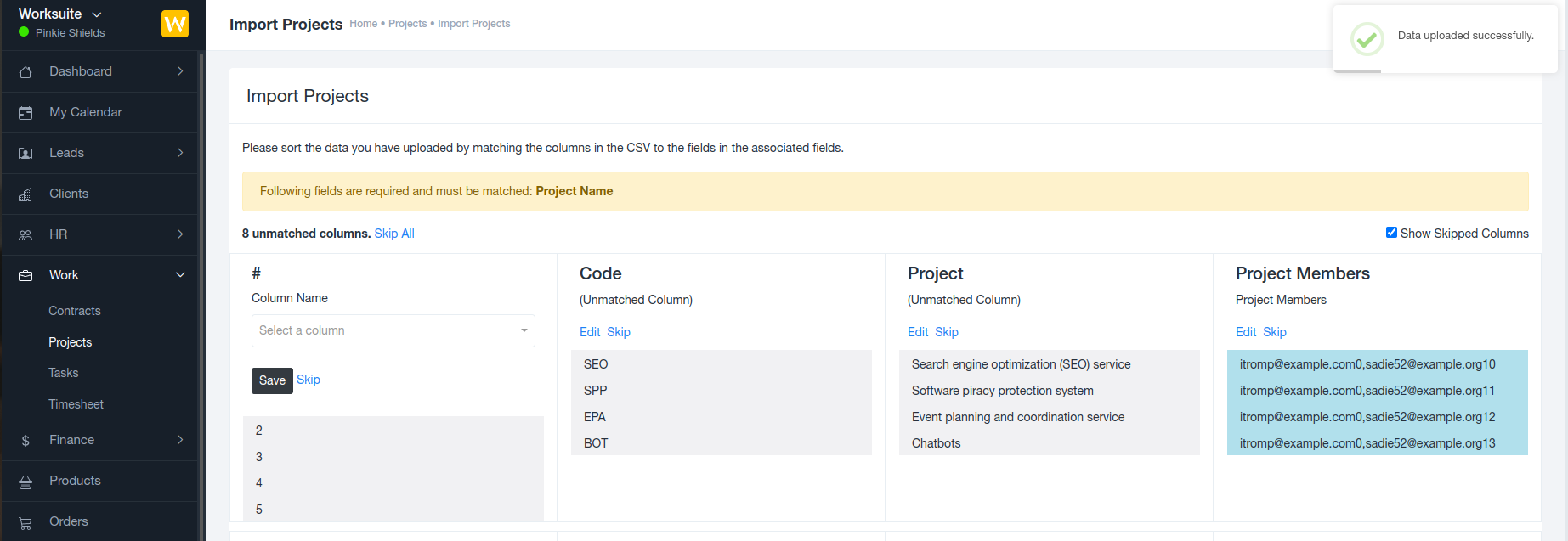
? What’s New?
A new option is now available in the Project Import process that allows you to include project members directly in the import file.
This means:
Projects are created with assigned members from day one
No need to manually add users after importing projects
Faster and more accurate project setup
? How It Works
Prepare the project import file (CSV/Excel)
Add the Project Members column
Enter the relevant user emails eg: user1-email,user2-email,user3-email
Upload the file using the Project Import option
Once the import is completed, the specified users are automatically added as members to their respective projects.
? Benefits
Eliminates manual post-import configuration
Reduces setup time for large project migrations
Ensures correct team assignments
Improves project visibility and collaboration from the start
✅ Ideal Use Cases
Migrating projects from another system
Bulk project creation for multiple teams
Onboarding new clients with pre-assigned teams
Was this article helpful?
That’s Great!
Thank you for your feedback
Sorry! We couldn't be helpful
Thank you for your feedback
Feedback sent
We appreciate your effort and will try to fix the article