1. Overview
Tap Payment Gateway is integrated to support:
✅ One-Time Payments (Order Payments)
✅ Lifetime Payments (Single purchase – no renewal)
✅ Subscription Payments (Recurring billing)
Tap can be configured from the SuperAdmin Panel and used for subscription billing and restaurant payments.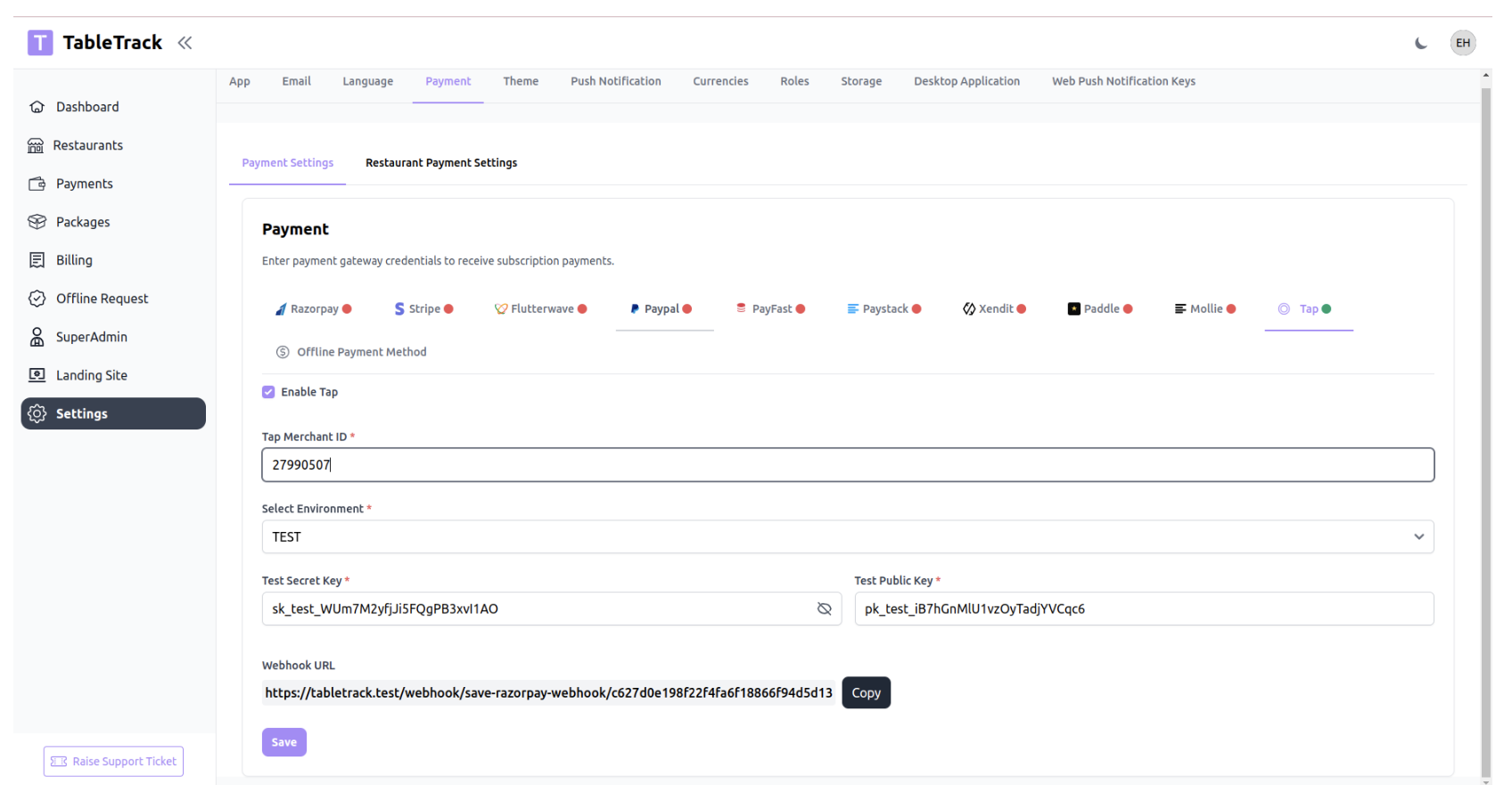
2. Configuration (SuperAdmin Panel)
? Navigation Path
SuperAdmin Login → Settings → Payment → Tap
This section is used to configure Tap credentials globally.
3. Required Credentials
The following fields are required to enable Tap:
1. Tap Merchant ID
Unique Merchant ID provided by Tap.
2. Environment
- TEST – For sandbox testing
- LIVE – For real transactions
3. Secret Key
Used for server-side authentication and secure API calls.
- Test format example:
sk_test_************************
4. Public Key
Used on frontend checkout page.
- Test format example:
pk_test_************************
5. Setup Steps
1. Login as SuperAdmin
2. Go to Settings → Payment → Tap
3. Enable the Tap toggle
4. Enter:
- Merchant ID
- Select Environment (TEST / LIVE)
- Secret Key
- Public Key
5. Click Save
6. Webhook Configuration
Tap requires a webhook to confirm payments securely.
Webhook URL
The system automatically generates a webhook URL.You must:
1. Copy the Webhook URL from:
SuperAdmin → Settings → Payment → Tap
2. Go to your Tap Merchant Dashboard
3. Add this URL inside Webhook Settings
4. Enable event notifications for:
- Charge success
- Charge failure
- Subscription events (if using recurring)
⚠️ Webhook is mandatory for reliable payment confirmation.
6. Payment Types Supported
A. One-Time Payment (Order Payment)
Use Case:
Customer places an order and pays once.
Flow:
1. Customer selects Tap at checkout2. Redirected to Tap payment page
3. Payment processed
4. Tap redirects back to site
5. Webhook confirms payment
6. Order status updated to Paid
On Success:
- Payment status → Completed
- Order status → Paid
- Transaction ID stored
- Notification triggered
On Failure:
- Payment status → Failed
- Order remains unpaid
- Customer sees error message
B. Lifetime Payment
Use Case:Customer buys a package with no recurring billing.
Example:
- Lifetime subscription plan
- One-time premium activation
Flow:
1. Customer selects Lifetime Plan
2. Payment processed via Tap
3. On success:
- Plan activated permanently
- No future billing
- Status marked as active
Important:
- No recurring token is stored
- No future charges attempted
C. Subscription Payment (Recurring Billing)
Use Case:Monthly or yearly subscription plans.
Flow:
1. Customer selects subscription plan
2. Tap creates:
- Initial charge
- Recurring agreement
3. Customer completes payment
4. Webhook confirms subscription activation
Recurring Behavior:
- Tap automatically charges customer based on plan cycle
- Webhook updates subscription status
Subscription Status Handling:
Tap Event System Action
Subscription Active Activate plan
Payment Success Extend billing period
Payment Failed Mark subscription as pending
Subscription Cancelled Deactivate plan
Was this article helpful?
That’s Great!
Thank you for your feedback
Sorry! We couldn't be helpful
Thank you for your feedback
Feedback sent
We appreciate your effort and will try to fix the article